 erkemoz
← All programs
Erkemoz - IPTV Player
A free IPTV player for Windows, Android phones and Android TV. You add your own server or playlist; no channels are included.
Latest version: v1.0.7 · Windows ≈ 25 MB · APK ≈ 96 MB
Windows 10 / 11 (64-bit) · Android phone, tablet and TV · free
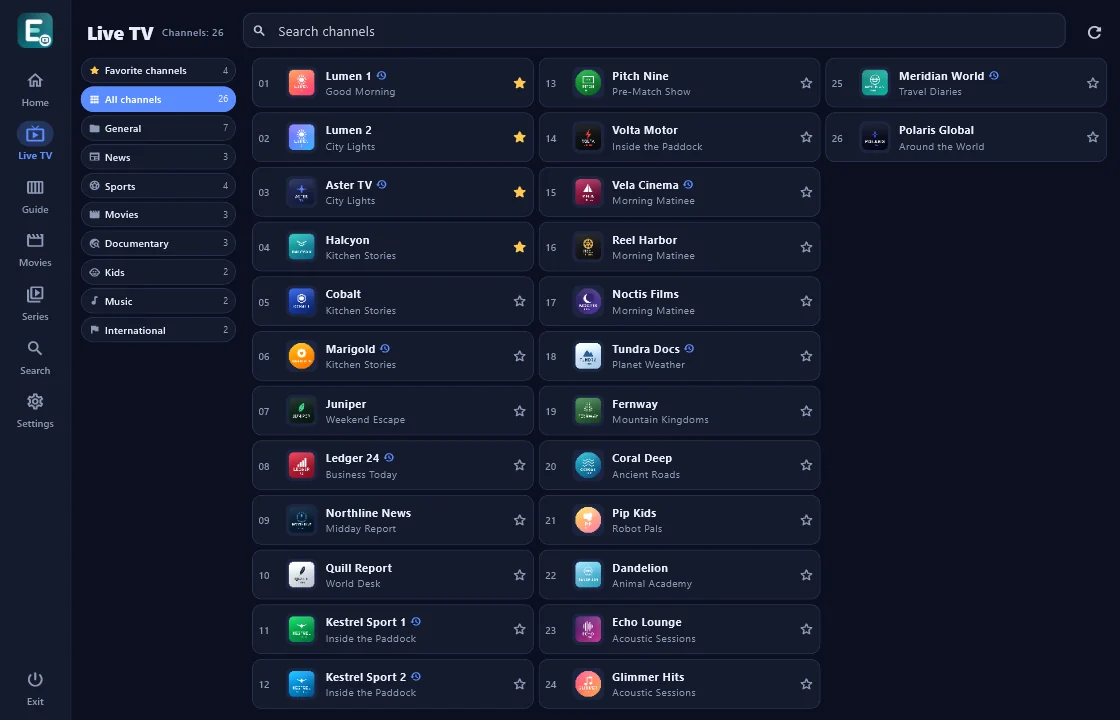
Shown in your chosen language and theme.
Legal notice
Erkemoz - IPTV Player is a media player only. It does not include, provide or sell any channels, streams, movies, series or playlists. It is designed for watching content you are legally entitled to watch, using a server or playlist you add yourself. You are solely responsible for the content you add and how you use it; any use that infringes copyright is prohibited. erkemoz is not affiliated in any way with any third-party servers or playlists.
What it does
- Live TV: categories on the left, channels in columns with their logos. Change channel with ▲▼; while you watch, a panel slides in from the left with channels, categories and the menu.
- Guide (EPG), and catch-up to watch earlier programmes if your provider supports it.
- Movies and series with posters and details, seasons and episodes, resume where you left off, recently watched and favourites.
- Audio and subtitles in one panel: language, size and colour. While you browse the menus, the stream keeps playing in a small window in the corner, and the program starts with the last channel you watched.
- Categories arrive complete, in the order your server sends them. The Completeness report tells you whether every item the server sent is shown.
- Several servers, your server's expiry date, and a parental lock that locks or hides categories with a PIN.
- On a TV, scan a QR code with your phone and send your server details from it — no typing with the remote. Voice search on Android.
- 7 themes, 8 languages, full screen on Windows; updates itself.
Installation
- Windows: Download the installer and run it.
- If Windows shows "Windows protected your PC" (SmartScreen), click "More info" → "Run anyway". This warning appears because the program isn't signed with a paid certificate yet.
- Android and Android TV: download the APK and open it; when asked, allow installing apps from unknown sources. To get it onto a TV, you can use the “Downloader” or “Send Files to TV” app.
- Open the program and add your Xtream Codes server (address, username and password) or your M3U playlist.
Good to know
- Erkemoz doesn't provide streams or playlists; use it only for content you're legally entitled to watch.
- You need your own server or playlist. The Guide, catch-up and expiry date depend on what your provider supports.
- Android and Android TV are trademarks of Google LLC. This program isn't affiliated with Google.
- Only download from erkemoz.app; copies from elsewhere may have been altered.

Find the tools useful?
They're free and will stay free. If one saved you some time, you can buy me a coffee — it helps keep new programs coming.