 erkemoz
← All programs
Erkemoz - PDF Toolkit
A free app to edit and convert PDF files, for Windows.
Latest version: v1.0 · ≈ 40 MB · Windows 10 / 11 · 64-bit · free
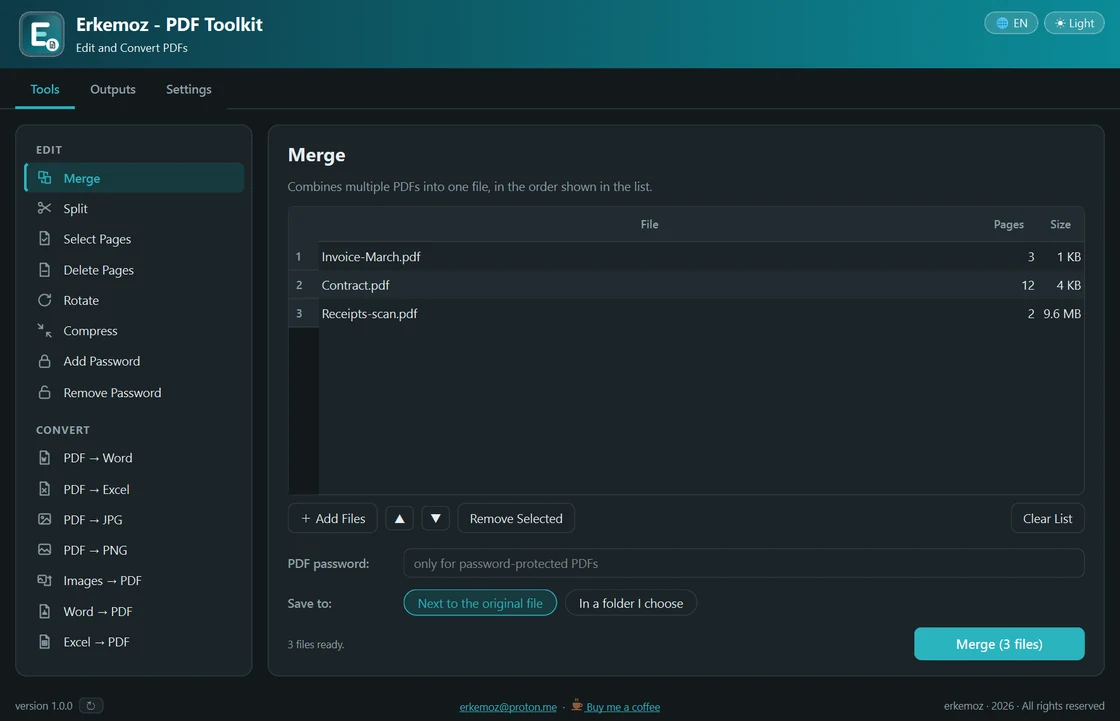
Shown in your chosen language and theme.
What it does
- Edit: merge, split, select pages, delete pages, rotate, add a password, remove a password.
- Compress: shrinks the photos inside a PDF, with three levels. Saves the most on scanned and photo-heavy documents.
- Convert: PDF to Word, Excel, JPG and PNG; images, Word and Excel to PDF.
- Drag and drop your files and change the merge order right in the list. Processes many files in one go.
- Your original file is never touched: every task creates a new file and never overwrites one with the same name. Everything you create stays in the Outputs tab.
- Light/dark theme; 8 languages.
Installation
- Download the installer and run it.
- If Windows shows "Windows protected your PC" (SmartScreen), click "More info" → "Run anyway". This warning appears because the program isn't signed with a paid certificate yet.
- Open the app, pick a tool on the left, drop in your files and click the button at the bottom.
Good to know
- PDF to Word needs Microsoft Word on your PC. Word to PDF and Excel to PDF work with Microsoft Office or the free LibreOffice. All other tools need nothing else.
- If you forget the password you set on a PDF, the file can't be opened; the password can't be recovered.
- Only download from erkemoz.app — modified copies won't run.

Find the tools useful?
They're free and will stay free. If one saved you some time, you can buy me a coffee — it helps keep new programs coming.