Skip to content
erkemozerkemoz.app
← Game Patches, Mods & Cheats

Foundation Cheat Panel

Free in-game cheat panel / trainer (hile paneli). Installs with one click.

Foundation Cheat Panel v1.2

Steam · Mod

A cheat panel that opens on top of the game with F11: add any resource in any amount, make your gold unlimited, make workplace storage and warehouses ten times bigger, bring in immigrants, gain influence, unlock everything and build instantly. Available in 8 languages.

No-installer package (zip) →

About

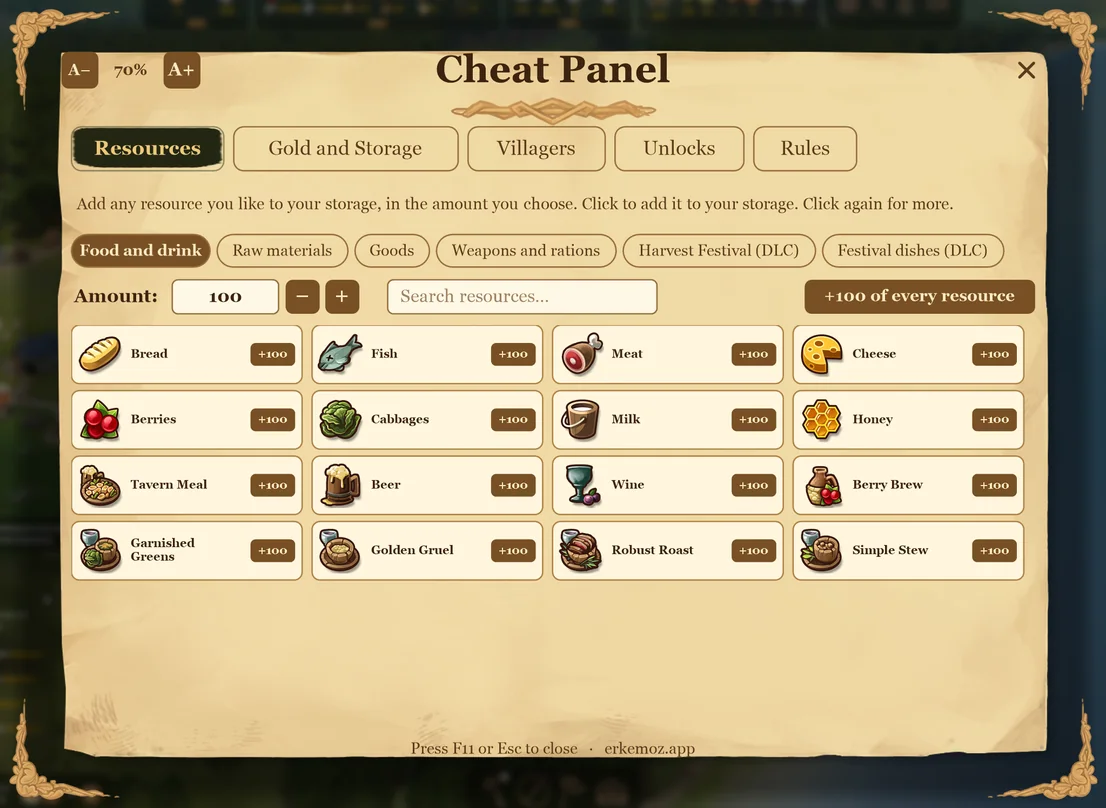
A free cheat panel (trainer) for Foundation. Once your village is founded, press F11 and a panel opens on top of the game, drawn with the game's own parchment and frame artwork. All 90 of the game's resources (bread, fish, planks, tools, Harvest Festival goods…) are laid out as cards with their in-game icon and name; type an amount, click a resource, and that much goes into your storage. Use the search box to find a resource by name, and A− / A+ to shrink the cards so more fit on screen.

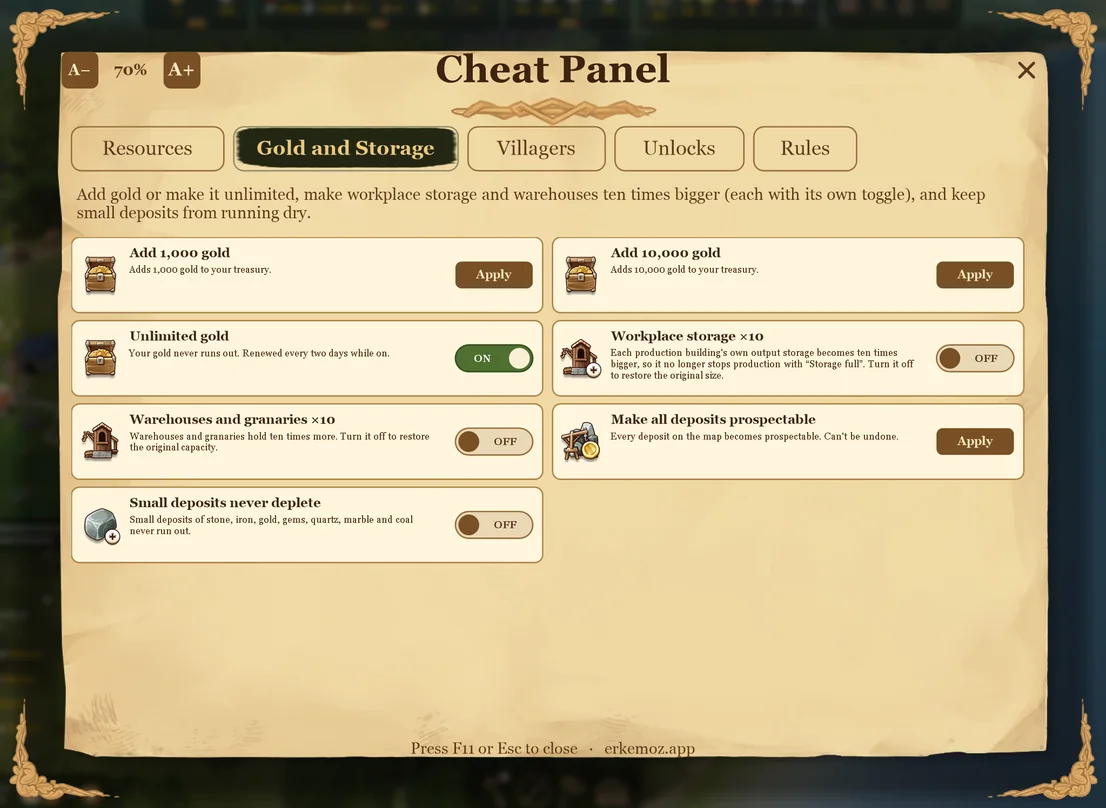
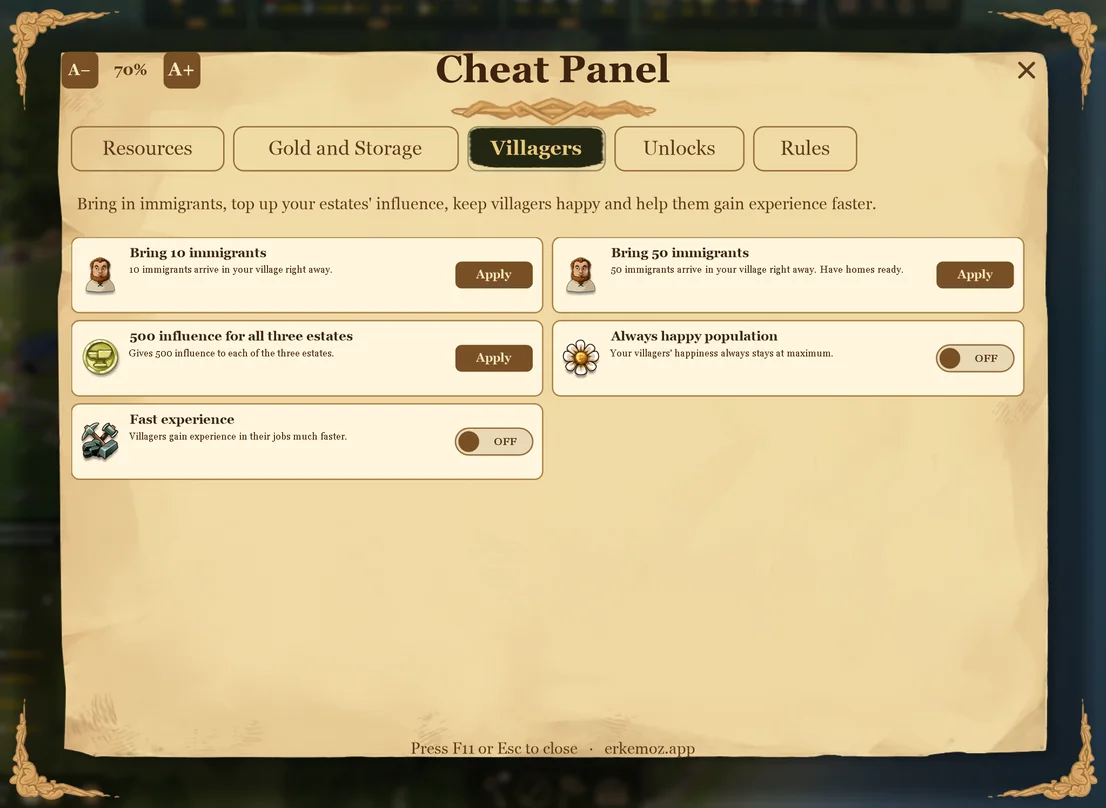
You can add gold or make it unlimited, and make workplace output storage and warehouses/granaries ten times bigger, each with its own toggle. You also get immigrants, influence for all three estates, fast experience, an always-happy population, every unlock, edict and privilege, free territories, an invincible army and instant construction. Toggle switches show ON or OFF, and every card says what it does. The cheats are applied by a mod running on the game's own Lua modding system; the panel is a small program that starts and exits with the game, never touches the original game files and never goes online.

At a glance

  • Opens on top of the game with F11; F11 or Esc closes it
  • 5 sections: Resources, Gold and Storage, Villagers, Unlocks, Rules
  • 8 languages: Türkçe, English, Deutsch, Français, Español, Português, Italiano, Русский
  • Runs on the game's own mod system; no separate mod loader needed

Screenshots

The pictures show the panel on top of the game. The panel follows your game language; here it's shown in this page's language. Click to enlarge.

How to open it

  1. Start the game from Steam as usual.
  2. When you start a new game or load a save (Load Game → Edit DLCs & Mods), enable “Erkemoz Hile Paneli” in the mod list.
  3. Once your village is founded, press F11. The panel opens on top of the game; F11 or Esc closes it. A− / A+ in the top-left corner make the cards smaller or larger.

What's inside

  • Resources: 90 resources in six groups (food, raw materials, goods, weapons, Harvest Festival, festival dishes), each card showing the resource's in-game icon. Type an amount or set it with − / +, then click a resource. You can search by name, or add that amount of every resource in one click.
  • Gold and Storage: 1,000 or 10,000 gold, unlimited gold, workplace storage ×10, warehouses and granaries ×10, small deposits that never run out.
  • Villagers: 10 or 50 immigrants, 500 influence for all three estates, fast experience, an always-happy population.
  • Unlocks: unlock all progression, every edict and privilege, and make every deposit prospectable.
  • Rules: free territories (no upkeep), an invincible army, instant construction. Toggle switches show ON or OFF.

Easiest: with Erkemoz - Game Mods

  1. Download and install Erkemoz - Game Mods. It's free.
  2. It finds your Steam and Ubisoft Connect games by itself. In “Library”, click “Install” on the game's card.
  3. When a new version is out, an “Update” button appears on the card. Turn on “Install new patch versions automatically” in Settings and it updates by itself.
  4. If a game update breaks the patch, Game Mods sets it aside and reinstalls it once a compatible version is out.

With the installer (recommended)

  1. Click “Download installer” on this page and run the downloaded file.
  2. If Windows shows "Windows protected your PC" (SmartScreen), click "More info" → "Run anyway". This warning appears because the program isn't signed with a paid certificate yet.
  3. The installer places the panel in Documents\Polymorph Games\Foundation automatically; it doesn't ask for a folder or need administrator rights.

Without the installer

  1. Download the zip from the “No-installer package (zip)” link and extract it to a folder.
  2. In File Explorer, open Documents\Polymorph Games\Foundation (it exists if you've run the game at least once).
  3. Copy the moddev and mods folders from the zip into it, merging them with any existing folders. You don't need KURULUM.txt.
  4. You should end up with moddev\erkemoz_hile.lua, moddev\erkemoz_hile\ErkemozHilePaneli.exe and the mods\ErkemozHile folder.

Frequently asked questions

I press F11 but the panel doesn't open.

The panel starts together with the game, so close and reopen the game once after installing. Documents\Polymorph Games\Foundation\moddev must contain erkemoz_hile.lua and erkemoz_hile\ErkemozHilePaneli.exe; F11 only works while the game window is in focus. If you extracted the zip yourself and Windows shows a security warning, right-click the zip → Properties → Unblock, then extract it again. If the panel opens but says the cheat mod isn't running, enable “Erkemoz Hile Paneli” in the mod list when you load your save; the cheats work once your village is founded.

Will the cheats break my save?

Resources, gold, immigrants and influence you add, and anything you unlock, are real changes to your game and stay in your save once you save. “All unlocks” and “All deposits prospectable” can't be undone, so back up your save first. The storage cheats aren't written to the save: switch them off or remove the panel and storage returns to its normal size. The game turns off achievements while mods are enabled.

Are toggles restored when I load a save?

Yes. Storage cheats are reapplied as soon as the save loads. Rule cheats (unlimited gold, happiness, army, construction…) switch back on automatically after one in-game day; while on, they're renewed every two days, and once you switch one off it wears off within two in-game days.

Why did the panel open in English?

The panel follows the game's language setting and comes in 8 languages: Turkish, English, German, French, Spanish, Portuguese, Italian and Russian. If the game is set to any other language, the panel opens in English. Resource names always come from the game's own translation.

Windows says “Windows protected your PC” when I open the installer. Is it safe?

Windows SmartScreen shows this warning because the installers aren't signed with a paid code-signing certificate. Click “More info → Run anyway”. If you like, compare the file's SHA-256 fingerprint with the one in the release notes on GitHub.

What's the easiest way to stay up to date?

Erkemoz - Game Mods. It installs new versions by itself; if a game update breaks a patch or panel, it sets it aside and reinstalls it once a compatible version is out. If you downloaded it manually from this page, check back here for new versions.

I found a bug or a missing translation. Where do I report it?

Write to [email protected]. A screenshot makes the problem easier to find; fixes are published in a new version.

Uninstalling

Control Panel → Programs → “Foundation Hile Paneli”. If you installed manually from the zip, delete moddev\erkemoz_hile.lua, the moddev\erkemoz_hile folder and the mods\ErkemozHile folder in Documents\Polymorph Games\Foundation.

Good to know

  • The patches are unofficial; games and their names belong to their owners. Play with your own copy of the game.
  • The patches and cheat panels were made and tested on the Steam versions of the games. If one doesn't work on another version such as Epic Games, GOG or Xbox / Game Pass, write to me and we'll look into it together.
  • Found a bug or a missing translation? Write to me: [email protected]

Find the tools useful?

They're free and will stay free. If one saved you some time, you can buy me a coffee — it helps keep new programs coming.

Buy me a coffee